
Location mapping
Map each Shopify location to a Zoho warehouse so stock goes to the right place.
Shopify keeps stock per location. Zoho keeps it per warehouse. Location mapping tells Zync which warehouse stands for which location. Inventory sync uses it in both directions.
You find it on the Connection page, under Location Mapping, once Zoho is connected.
Map your locations
The table lists every active Shopify location with a Zoho Warehouse menu and a status badge.
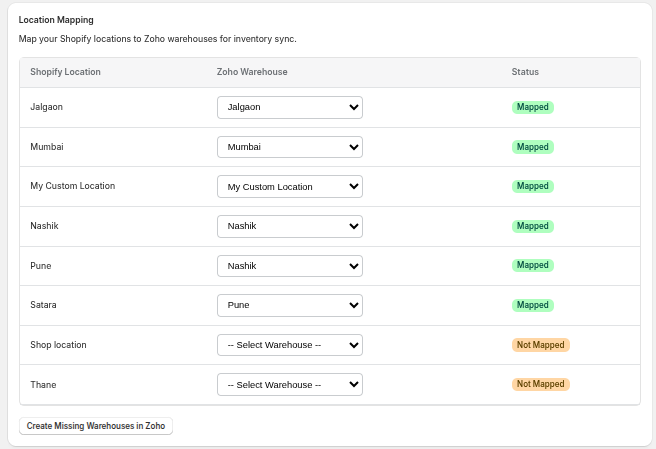
- For each Shopify location, choose its Zoho warehouse. The primary warehouse is marked (Primary).
- The badge changes from Not Mapped to Mapped.
- Click Save in the bar at the top of the Shopify admin.
To remove a mapping, set the menu back to -- Select Warehouse -- and save.
Shortcuts
What you see depends on how many warehouses your Zoho organisation has.
| Zoho has | The app offers | Result |
|---|---|---|
| No warehouses | Create All Shopify Locations as Zoho Warehouses | Creates one Zoho warehouse per Shopify location, with the same name |
| One warehouse | Map All Locations to (warehouse name) | Maps every Shopify location to that warehouse and saves |
| Several warehouses | Create Missing Warehouses in Zoho | Creates a warehouse for each Shopify location that has no warehouse of the same name |
After warehouses are created, reload the page, then map and save.
Using more than one warehouse
Zoho only allows several warehouses when the feature is switched on. If creating warehouses fails with a message about multi-warehouse:
- In Zoho Inventory, open Settings → Preferences → Warehouses.
- Enable Multi-Warehouse.
- Return to Zync and try again.
If you prefer to keep a single warehouse, map every Shopify location to it instead.
What an unmapped location means
- Shopify to Zoho stock updates for an unmapped location cannot be sent to a specific warehouse.
- Zoho to Shopify stock updates from a warehouse with no mapped location go to the first mapped location.
Map every location that holds stock before you switch on inventory sync.
When your locations change
Add a mapping when you open a new Shopify location, and review the table when you rename or close a warehouse in Zoho. Zync does not change mappings on its own.